星期三, 12月 12, 2007

Exchange Server 2007 Service Pack 1 - 繁體中文

千呼萬喚始出來 !

Microsoft Exchange Server 2007 Service Pack 1 (SP1) has been designed specifically to help meet the challenges of any business and the needs of all the different groups with a stake in the messaging system. Exchange Server 2007 SP1 is a mission-critical communications tool that enables employees to be more productive and access their information anywhere and anytime while providing a messaging system that enables rich, efficient access to e-mail, calendar items, voice mail, and contacts. For the administrator, Exchange Server 2007 SP1 provides advanced protection options against e-mail security threats, such as spam and viruses, as well as the tools to help manage internal compliance and high availability needs.

Exchange Server 2007 Updating Support Skills on Setup and System Management

Exchange Server 2007 Updating Support Skills on Setup and System Management was written by Microsoft Customer Service and Support to prepare Support Engineers who are assisting customers installing Exchange Server 2007 Service Pack 1 (SP1).


Windows Vista Service Pack 1 RC - All Language Standalone Package

Windows Vista Service Pack 1 (SP1) RC should be used to update a PC running Windows Vista RTM to Windows Vista SP1. This standalone package will install SP1 as well as any applicable pre-requisite packages.

The All-Language standalone package supports installations on all versions of Windows Vista with one or a combination of the 36 Windows Vista languages installed.

Uninstall Instructions for Windows Vista SP1 RC:Windows Vista SP1 RC does not support build-to-build upgrades. If you install this build to your system, you need to uninstall it before moving to the final Vista SP1 RTM version.

Prerequisite packages (KB935509, KB937287 and KB938371) for Window Vista SP1 are permanent and unistall of these packages is disabled by design. During the installation of Windows Vista SP1 RC, the installer determines whether or not you need the prerequisite packages and updates your system automatically.

星期三, 10月 17, 2007

還原隱藏檔案與資料夾選項

電腦有可能因為被惡意程式改寫機碼之後造成在資料夾選項中找不到隱藏檔案與資料夾的功能,此時可我們可以自行增加機碼來還原。

到 HKEY_LOCAL_MACHINE\SOFTWARE\Microsoft\Windows\CurrentVersion\explorer\Advanced\Folder\Hidden 下增加名稱為 Type,類型 REG_SZ,資料 group 即可。

防止 Windows Update 重新啟動電腦

Windows Update 是個很方便的工具,平日默默的在背景中工作,等到自動安裝完更新需要重新開機時就會跳出提示視窗來出一下風頭,若當時我們很需要使用電腦不能重新開機,提示視窗又很盡責的提醒我們需要重新開機,此時怎麼辦?

暫時停止 Windows Update 服務
在開始功能表的搜尋對話方塊中輸入 cmd,接著 Ctrl+Shift+Enter 以系統管理員身分來執行命令提示字元視窗,並在視窗下執行 net stop "windows update" 來停用 Windows Update 服務,不過別擔心,重新開機之後 Windows Update 還會是啟用的狀態。

更改機碼
此方法似乎對 Windows XP Home 和 Windows Vista Home 沒有作用,不過還是寫出來參考看看。執行 regedit 並且切換到 HKEY_LOCAL_MACHINE\SOFTWARE\Policies\Microsoft\Windows\WindowsUpdate\AU
新增一個 32-bit DWORD 名稱為 NoAutoRebootWithLoggedOnUsers 數值為 1。這樣就可以防止當使用者登入電腦時重新開機了。

星期四, 10月 11, 2007

Windows 工作管理員被停用了嗎?

若要正常啟用 Windows 工作管理員,請用 regedit 編輯機碼HKEY_CURRENT_USER\Software\Microsoft\Windows\CurrentVersion\Policies\System
右手邊視窗有個 REG_DWORD 的類型名稱為 DisableTaskMgr,其數值資料可為 :
1 - 停用 Windows 工作管理員
0 - 啟用 Windows 工作管理員
或是把 DisableTaskMgr 刪除掉也可以 (不建議)

星期五, 9月 07, 2007

如何建立 SPF 記錄與技巧

The print-ready brochure describes the benefits of authenticated e-mail and of Sender ID implementation to both senders and recipients.


星期一, 7月 23, 2007

於 Windows Vista 中的右鍵選單中新增複製與移動選項

將以下兩則機碼分別存成 Reg 檔案並且加以執行即可。

複製
Windows Registry Editor Version 5.00
[HKEY_CLASSES_ROOT\AllFilesystemObjects\shellex\ContextMenuHandlers]
[HKEY_CLASSES_ROOT\AllFilesystemObjects\shellex\ContextMenuHandlers\{C2FBB631-2971-11D1-A18C-00C04FD75D13}]

移動
Windows Registry Editor Version 5.00
[HKEY_CLASSES_ROOT\AllFilesystemObjects\shellex\ContextMenuHandlers]
[HKEY_CLASSES_ROOT\AllFilesystemObjects\shellex\ContextMenuHandlers\{C2FBB630-2971-11D1-A18C-00C04FD75D13}]

此機碼用於 Windows XP 也同樣有效。

星期一, 7月 02, 2007

Windows Vista 使用安全登入

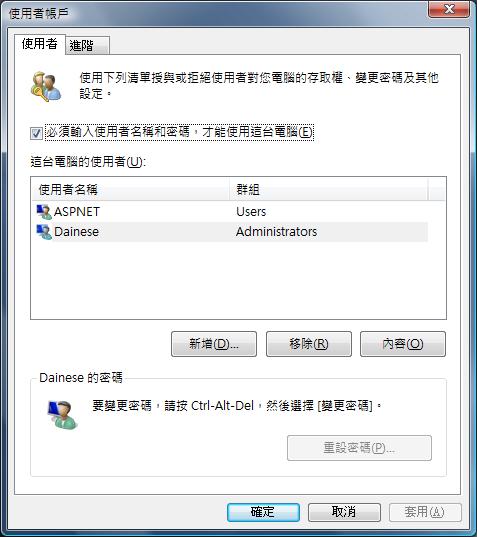
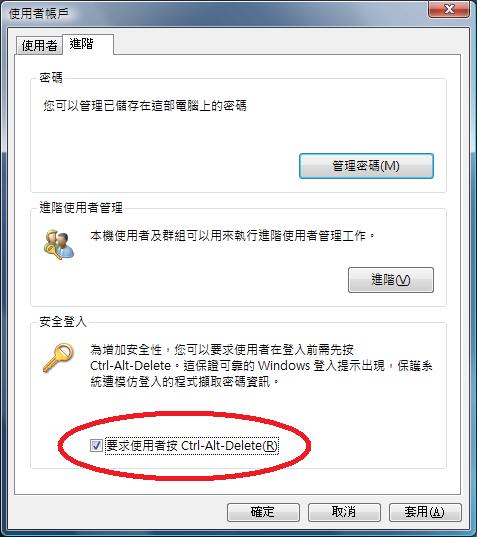
在 Windows Vista 中要如何要求使用者在登入電腦時一定要按 Ctrl-Alt-Delete 呢? 很多人在控制台中的使用者帳戶遍尋不著,其實只要執行

control userpasswords2

就可以開啟一個隱藏的使用者帳戶的管理工具,接著勾選要求使用者按 Ctrl-Alt-Delete 即可。


星期五, 6月 29, 2007

停用 Windows Vista 的 Flip3D 功能

停用
[HKEY_LOCAL_MACHINE\SOFTWARE\Policies\Microsoft\Windows\DWM]
"DisallowFlip3d"=dword:00000001


啟用
[HKEY_LOCAL_MACHINE\SOFTWARE\Policies\Microsoft\Windows\DWM]
"DisallowFlip3d"=-

接著還需要重新啟動 desktop window manager service,以系統管理員身分執行命令列提是字元來執行以下的指令即可完成。

net stop uxsms
net start uxsms

星期二, 6月 05, 2007

Windows Vista 取得檔案擁有權

在 Windows Vista 下不論是透過 GUI 圖形介面或是 CLI 命令提示介面想要取得檔案與資料夾的所有權都不是一件簡單的事情,需要幾個繁瑣的步驟才能完成,我們可以透過新增機碼的方式在右鍵的選單中新增加一個取得擁有權的功能。

將以下的文字用記事本存成 .reg 的檔案並且執行。

Windows Registry Editor Version 5.00

[HKEY_CLASSES_ROOT\*\shell\runas]
@="取得所有權"
"NoWorkingDirectory"=""

[HKEY_CLASSES_ROOT\*\shell\runas\command]
@="cmd.exe /c takeown /f \"%1\" && icacls \"%1\" /grant administrators:F"
"IsolatedCommand"="cmd.exe /c takeown /f \"%1\" && icacls \"%1\" /grant administrators:F"

[HKEY_CLASSES_ROOT\Directory\shell\runas]
@="取得所有權"
"NoWorkingDirectory"=""

[HKEY_CLASSES_ROOT\Directory\shell\runas\command]
@="cmd.exe /c takeown /f \"%1\" /r /d y && icacls \"%1\" /grant administrators:F /t"
"IsolatedCommand"="cmd.exe /c takeown /f \"%1\" /r /d y && icacls \"%1\" /grant administrators:F /t"

完成之後只要對檔案或是資料夾按下右鍵即可發現有一個取得擁有權的選項,執行之後便可以取得該檔案與資料夾的擁有權了,這樣方便又省時。

星期一, 5月 14, 2007

移除 IE7 的 Search Bar

若不喜歡 IE7 內建的 Search Bar 出現在視窗右上方的話,是可以透過新增機碼的方式將它給關閉的。

[HKEY_LOCAL_MACHINE\SOFTWARE\Policies\Microsoft\Internet Explorer\Infodelivery\Restrictions]

"NoSearchBox"=dword:00000001

星期一, 4月 23, 2007

Exchange Server 2007 更新彙總套件一

Update Rollup 1 for Exchange Server 2007 解決了 Exchange Server 2007 推出之後所發現的問題,強烈建議使用 Exchange Server 2007 的用戶安裝此更新彙總套件,更多的資訊可以參閱 KB930809


Microsoft Office Word、Excel 及 PowerPoint 2007 檔案格式相容性套件

相信目前很多人仍在使用 Microsoft Office 2000、Office XP 或 Office 2003,只要安裝此相容性套件之後便可以使用 Word、Excel 和 PowerPoint 2007 的新檔案格式來做開啟、編輯與儲存檔案的動作。此相容性套件還可以與 Microsoft Office Word Viewer 2003、Excel Viewer 2003 及 PowerPoint Viewer 2003 合併使用,檢視以這些新的格式儲存的檔案。


星期日, 4月 08, 2007

在 Windows Vista 中啟用慢動作的 Aero 動畫

Windows Vista 中可以啟動慢動作的 Aero 動畫特效,增加以下機碼之後就能夠在開啟、關閉、最小化與復原視窗的同時按住 Shift 鍵便能夠看到這種特殊的效果,不過並不能改變動畫移動的速度,這是比較遺憾的地方。

[HKEY_CURRENT_USER\Software\Microsoft\Windows\DWM]
"Animations"=dword:00000001
"AnimationsShiftKey"=dword:00000001

星期三, 4月 04, 2007

如何禁止寫入 USB 裝置

企業環境中可能因為安全上的考量,所以會禁止電腦將資料寫入 USB 裝置,這時可以用更改機碼的方式來做到。


  • 禁止
    [HKEY_LOCAL_MACHINE\SYSTEM\CurrentControlSet\Control\StorageDevicePolicies]
    "WriteProtect"=dword:00000001
  • 允許
    [HKEY_LOCAL_MACHINE\SYSTEM\CurrentControlSet\Control\StorageDevicePolicies]
    "WriteProtect"=dword:00000000

如何關閉 Windows Vista 的安全桌面

當使用者帳號控制 (UAC) 為啟用的狀況下,遇到程式需要提高權限來執行的時候,電腦螢幕會變暗來提高使用者的注意力,微軟稱這個功能叫做安全桌面 (Secure Desktop),若是不喜歡這個功能的話可以手動將其關閉。

  • Windows Vista Business、Ultimate
    執行本機安全性原則 -> 本機原則 -> 安全性原則 -> 使用者帳號控制:提示提高權限時切換到安全桌面,將安全設定改成停用。
  • Windows Vista Home
    將機碼 [HKEY_LOCAL_MACHINE\SOFTWARE\Microsoft\Windows\CurrentVersion\Policies\System] 底下的 PromptOnSecureDesktop 數值改成 0。

星期二, 4月 03, 2007

使用命令列開啟或關閉使用者帳戶控制 (UAC)

使用者帳戶控制是有助於防止未經授權的變更電腦設定,一般情形下都建議保持開啟的狀態以保護電腦安全。除了可以藉由控制台 -> 使用者帳戶 -> 開啟或關閉使用者帳戶控制的地方來選擇開啟或是關閉之外,也可以透過命令列來做。

開啟
C:\Windows\System32\cmd.exe /k %windir%\System32\reg.exe ADD HKLM\SOFTWARE\Microsoft\Windows\CurrentVersion\Policies\System /v EnableLUA /t REG_DWORD /d 1 /f

關閉
C:\Windows\System32\cmd.exe /k %windir%\System32\reg.exe ADD HKLM\SOFTWARE\Microsoft\Windows\CurrentVersion\Policies\System /v EnableLUA /t REG_DWORD /d 0 /f

星期日, 3月 25, 2007

大量授權金鑰 (VLK)

大量授權金鑰是針對所購買微軟的每一份特定授權,核發給公司專門使用的金鑰。VLK 必須與適當的「大量授權」媒體搭配使用,並應該盡最大努力保存一份此產品金鑰的安全記錄,確保不將此產品金鑰洩漏給未獲授權之第三者。我們也可能會看見舊產品版本的大量授權產品金鑰,這是為了支援使用權合約中的降級權益,以便客戶在取得最新版本的產品之際,仍然能使用較舊的版本。

  • VA 1.0 - Volume Activation 1.0 (大量授權啟用 1.0) 是第一代的 VLK。本金鑰能夠跳過產品啟用。
  • VA 2.0/KMS – Volume Activation 2.0/Key Management Service (大量授權啟用 2.0/金鑰管理服務):這個金鑰能用來啟用您的環境內的新服務,自動啟動 Windows Vista 電腦。要使用 KMS,必須至少有 25 台相連的 Microsoft Vista 電腦,而且所有的電腦每年必須由中央服務單位檢查兩次,方能保持啟動。
  • VA 2.0/MAK – Volume Activation 2.0/Multiple Activation Key (大量授權啟用 2.0/多重啟用金鑰):這個金鑰能透過網際網路或電話啟動 Microsoft Windows Vista,而且僅與有限數目的啟用關聯。電腦可從其個別電腦上進行啟動,亦透過中央電腦同時與其他多台電腦一起被啟動。
有關微軟大量授權金鑰的進一步資訊,包括金鑰類型、最佳使用方法和部署選擇等其他資訊,請至: http://www.microsoft.com/licensing/resources/vol/default.mspx

星期五, 3月 02, 2007

Windows Vista 支援之記憶體大小

Windows Vista Starter : 1GB。

32 位元版本
Windows Vista Home Basic、Home Premium、Business、Enterprise 和 Ultimate 皆為 4GB。

64位元版本
Windows Vista Home Basic : 8GB
Windows Vista Home Premium : 16GB
Windows Vista Business、Enterprise 和 Ultimate : 128GB