Outlook Express
OLEXP: Missing Dialog Box When Message Has a Blank Subject Linehttp://support.microsoft.com/?kbid=216884
Outlook
1. 執行 Outlook
2. 開啟 Visual Basic 編輯器 (按 ALT + F11)
3. 展開視窗左方的 Microsoft Outlook 物件, 雙按 ThisOutlookSession, 在右方的程式碼視窗中輸入下列程式碼.
Private Sub Application_ItemSend(ByVal Item As Object, Cancel As Boolean)
Dim strSubject As String
strSubject = Item.Subject
If Len(Trim(strSubject)) = 0 Then
Prompt$ = “信件主旨為空白, 你確定要將郵件寄出嗎?”
If MsgBox(Prompt$, vbYesNo + vbQuestion + vbMsgBoxSetForeground, “檢查信件主旨”) = vbNo Then
Cancel = True
End If
End If
End Sub
星期三, 9月 06, 2006


星期一, 9月 04, 2006
Podcasts: How Microsoft IT Monitors and Manages the Exchange Messaging Infrastructure as a Service
Overview
Managing Exchange Messaging Services by Using Metrics discusses how Microsoft IT improved its messaging services using targeted metrics and process. This white paper covers service level agreements (SLAs) and key measures that Messaging IT uses to determine service improvements and related decisions. The paper introduces service reviews and why they are an important component of running a service; includes sample scorecards of weekly and monthly reviews.

Managing Exchange Messaging Services by Using Metrics discusses how Microsoft IT improved its messaging services using targeted metrics and process. This white paper covers service level agreements (SLAs) and key measures that Messaging IT uses to determine service improvements and related decisions. The paper introduces service reviews and why they are an important component of running a service; includes sample scorecards of weekly and monthly reviews.
Windows Vista 版本簡介
數位化時代的來臨是勢不可擋的,儘管許多數位資訊管理工具在功能面已大幅增進且多元化,但仍須投入相當多的時間去學習如何使用它,Windows Vista提出了全新的桌面體驗,讓使用者不用多花費時間去思考電腦作業系統的安全性、可靠性與管理性等問題,而能有更多時間專注在自己的工作上。Windows Vista其提供了新穎且具有彈性的方式來組織使用者的資料,使其能夠更容易的儲存、管理、搜尋與組織資每天工作上的資料,節省寶貴的時間讓工作更有效率。它更帶領我們聯繫不同的使用者、地點與裝置,不管是在家庭或工作場合,Windows Vista都是以使用者做為中心而出發的。
因為不同種類的電腦使用者需要不同功能的作業系統,所以微軟在過去分別提供了共六不同種版本的Windows XP作業系統,除了大家所熟之的家用版與專業版之外還有其他需要搭配特定硬體配置的版本,像是提供多媒體娛樂生活的Media Center Edition、平板電腦所使用的Tablet PC Edition、提供專業技術工作的64位元專業版以及在特定新興市場才有的Starter Edition。而在Windows Vista陣容中則依據一般消費者、中小型企業與中大型企業等不同的用戶提供適合的軟體版本。
微軟將原本獨立的Windows XP Media Center Edition其功能將納入Windows Vista Home Premium與Ultimate兩個版本中,而Tablet PC的部分也將納入Windows Vista Home Premium、Business Enterprise與 Ultimate之中,除了Windows Vista Starter之外所有的版本皆包含32與64位元供使用者做選擇,兼顧大多數32位元的電腦與64位元的高階系統。
Windows Vista Home Basic 是提供給家庭中入門級的使用者一個更安全、更可靠、更有效率的電腦環境,其主要訴求是要讓使用者能輕易上手,用簡單方式來瀏覽網頁,與摯友親朋互通電子郵件或編輯文件等工作。
Windows Vista Home Premium主要是針對一般消費者的桌上型與筆記型電腦所設計的,其包含Windows Vista Home Basic的所有功能,讓家中的個人電腦除了基本運算需求像是上網、寫作業、燒錄DVD等工作外更加上了Windows Media Center功能,讓我們輕輕鬆鬆即可分享心愛的照片、音樂、影片甚至是電視節目給其他人,並且讓這種數位娛樂的體驗能溶入我們每天的生活中。
Windows Vista Ultimate是設計給一般消費者與小型企業的旗艦級版本,使用者可利用一部個人電腦即可處理家中與工作上的所有事務。此版本包含Windows Vista Home Premium及Windows Vista Enterprise的所有功能。Windows Vista Ultimate是第一個整合企業基礎建設、行動運算生產力與數位娛樂生活的作業系統,不論是家庭視聽娛樂或是辦公室工作,甚至是經常在外打拼的街頭勇士,Windows Vista Ultimate可說是提供全方位的功能來滿足使用者的需求。
Windows Vista Business主要是針對企業用戶的桌上型與筆記型電腦所設計,其提供了新穎且有效的搜尋、分享與組織資訊的方式,讓電腦執行的更安全更順暢,進而減低IT人員的負擔,進而使得IT人員在企業中發揮更高的價值。
Windows Vista Enterprise 是提供給有簽訂軟體保證合約(Microsoft Software Assurance agreement)的企用戶電腦所使用的版本,它協助這些擁有複雜架構的大型企業組織來降低成本,減少部署與管理電腦時所需要負擔,並能容易的執行資訊政策,提昇電腦的可靠度與安全性。
Windows Vista Starter是為了打擊盜版而提供給特定的開發中新興國家所使用的版本,讓他們用低廉的價格也能輕易的體驗到個人電腦在網路交流與學習中所帶來的好處,為了能夠安裝在較為低價的電腦上,所附功能較少且僅是32位元的作業系統但仍然能夠執行最新的應用程式和連接新的硬體裝置。
因為不同種類的電腦使用者需要不同功能的作業系統,所以微軟在過去分別提供了共六不同種版本的Windows XP作業系統,除了大家所熟之的家用版與專業版之外還有其他需要搭配特定硬體配置的版本,像是提供多媒體娛樂生活的Media Center Edition、平板電腦所使用的Tablet PC Edition、提供專業技術工作的64位元專業版以及在特定新興市場才有的Starter Edition。而在Windows Vista陣容中則依據一般消費者、中小型企業與中大型企業等不同的用戶提供適合的軟體版本。
微軟將原本獨立的Windows XP Media Center Edition其功能將納入Windows Vista Home Premium與Ultimate兩個版本中,而Tablet PC的部分也將納入Windows Vista Home Premium、Business Enterprise與 Ultimate之中,除了Windows Vista Starter之外所有的版本皆包含32與64位元供使用者做選擇,兼顧大多數32位元的電腦與64位元的高階系統。
Windows Vista Home Basic 是提供給家庭中入門級的使用者一個更安全、更可靠、更有效率的電腦環境,其主要訴求是要讓使用者能輕易上手,用簡單方式來瀏覽網頁,與摯友親朋互通電子郵件或編輯文件等工作。
Windows Vista Home Premium主要是針對一般消費者的桌上型與筆記型電腦所設計的,其包含Windows Vista Home Basic的所有功能,讓家中的個人電腦除了基本運算需求像是上網、寫作業、燒錄DVD等工作外更加上了Windows Media Center功能,讓我們輕輕鬆鬆即可分享心愛的照片、音樂、影片甚至是電視節目給其他人,並且讓這種數位娛樂的體驗能溶入我們每天的生活中。
Windows Vista Ultimate是設計給一般消費者與小型企業的旗艦級版本,使用者可利用一部個人電腦即可處理家中與工作上的所有事務。此版本包含Windows Vista Home Premium及Windows Vista Enterprise的所有功能。Windows Vista Ultimate是第一個整合企業基礎建設、行動運算生產力與數位娛樂生活的作業系統,不論是家庭視聽娛樂或是辦公室工作,甚至是經常在外打拼的街頭勇士,Windows Vista Ultimate可說是提供全方位的功能來滿足使用者的需求。
Windows Vista Business主要是針對企業用戶的桌上型與筆記型電腦所設計,其提供了新穎且有效的搜尋、分享與組織資訊的方式,讓電腦執行的更安全更順暢,進而減低IT人員的負擔,進而使得IT人員在企業中發揮更高的價值。
Windows Vista Enterprise 是提供給有簽訂軟體保證合約(Microsoft Software Assurance agreement)的企用戶電腦所使用的版本,它協助這些擁有複雜架構的大型企業組織來降低成本,減少部署與管理電腦時所需要負擔,並能容易的執行資訊政策,提昇電腦的可靠度與安全性。
Windows Vista Starter是為了打擊盜版而提供給特定的開發中新興國家所使用的版本,讓他們用低廉的價格也能輕易的體驗到個人電腦在網路交流與學習中所帶來的好處,為了能夠安裝在較為低價的電腦上,所附功能較少且僅是32位元的作業系統但仍然能夠執行最新的應用程式和連接新的硬體裝置。
星期二, 8月 22, 2006
Exchange Server 2007 PowerShell Scripts 範例
提供幾則簡單的 PowerShell 範例
敘述
新增一個及一個範圍的 IP 位置到 IP 封鎖清單中
範例
Set-IPBlockListConfig -Enabled:$True
Add-IPBlockListEntry -IPAddress 123.456.0.1
Add-IPBlockListEntry -IPRange 123.456.1.1-123.456.0.255
敘述
建立一個新的接收連接器將其命名為 Testrc,並且指定遠端 IP 位址的範圍
範例
New-ReceiveConnector testrc -Bindings:10.0.0.1:25 -RemoteIPRanges 123.456.0.1-123.456.0.10
敘述
指定一個信箱當作郵件日誌功能的收件者
範例
set-MailboxDatabase servername\MailboxDBName -JournalRecipient domain\username
敘述
舉出信箱超過容量限制的使用者
範例
get-MailboxStatistics where {"IssueWarning","ProhibitSend","MailboxDisabled" -contains $_.StorageLimitStatus} format-Table MailboxDisplayName,TotalItemSize
敘述
新增一個及一個範圍的 IP 位置到 IP 封鎖清單中
範例
Set-IPBlockListConfig -Enabled:$True
Add-IPBlockListEntry -IPAddress 123.456.0.1
Add-IPBlockListEntry -IPRange 123.456.1.1-123.456.0.255
敘述
建立一個新的接收連接器將其命名為 Testrc,並且指定遠端 IP 位址的範圍
範例
New-ReceiveConnector testrc -Bindings:10.0.0.1:25 -RemoteIPRanges 123.456.0.1-123.456.0.10
敘述
指定一個信箱當作郵件日誌功能的收件者
範例
set-MailboxDatabase servername\MailboxDBName -JournalRecipient domain\username
敘述
舉出信箱超過容量限制的使用者
範例
get-MailboxStatistics where {"IssueWarning","ProhibitSend","MailboxDisabled" -contains $_.StorageLimitStatus} format-Table MailboxDisplayName,TotalItemSize
星期一, 8月 21, 2006
Exchange Server 環境對抗垃圾郵件的方法
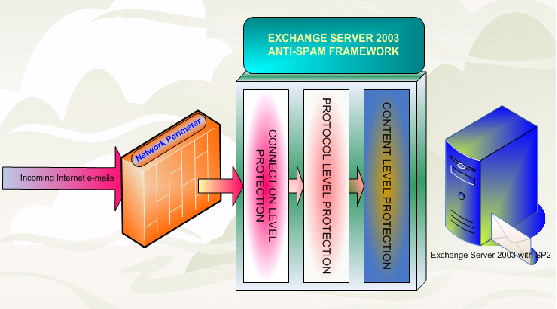
此技術指南說明 Exchange Server 環境下對抗垃圾郵件的功能與解決方案。包含Exchange Server 2003 Antispam 架構下結合不同的方法來阻隔垃圾郵件,不論是單一或多台 Exchange Server 環境中所包含的連線層級、通訊協定層級、內容層級的過濾,讓系統管理員與一般使用者都能明確的過濾和分類垃圾郵件,能夠自行決定垃圾郵件或合法的商業郵件。
按此下載
星期二, 8月 08, 2006
如何在 Outlook 2003 中更改 Windows NT 網域密碼
1. 按一下[工具]功能表上的[選項]。
2. 在[選項]對話方塊中,按一下[其他]索引標籤。
3. 按一下[進階選項]。
4. 按一下[自訂表單]。
5. 按一下[密碼]。
6. 在[變更Windows密碼]對話方塊中填入適當的訊息。
7. 按下四次[確定],以關閉[選項]對話方塊。
2. 在[選項]對話方塊中,按一下[其他]索引標籤。
3. 按一下[進階選項]。
4. 按一下[自訂表單]。
5. 按一下[密碼]。
6. 在[變更Windows密碼]對話方塊中填入適當的訊息。
7. 按下四次[確定],以關閉[選項]對話方塊。
星期四, 8月 03, 2006
自動接受代理程式( Auto Accept Agent) 部署及系統管理手冊
本手冊說明如何安裝、設定及管理「自動接受代理程式」,這是可自動為資源信箱處理會議要求的儲存區事件接收器。本手冊可引導您執行安裝程序,在您的電腦上完成「自動接受代理程式」的安裝,並將它註冊為「元件物件模型 (COM+)」元件。「自動接受代理程式」安裝完成後,接著就必須加以設定,並針對執行此事件接收器的資源信箱進行註冊。此外,本手冊還提供與「自動接受代理程式」相關的疑難排解資訊。
按此下載
按此下載
Microsoft Exchange Troubleshooting Assistant v1.0 下載
Exchange Troubleshooting Assistant 可以自動從 Exchange Server 上收集設定資料、效能計數器與即時追蹤。此工具能夠協助找出造成效能、訊息流向與資料庫裝載等問題的原因。
File Name: ExTRA.MSI
Version: 1.0.7843.0
Date Published: 8/2/2006
Language: English
Download Size: 4.2 MB
按此下載
File Name: ExTRA.MSI
Version: 1.0.7843.0
Date Published: 8/2/2006
Language: English
Download Size: 4.2 MB
按此下載
星期五, 7月 28, 2006
Microsoft Forefront Security for Exchange Server 下載
Overview
Forefront Security for Exchange protects organizations against the latest threats by managing multiple antivirus scan engines at multiple layers throughout the e-mail infrastructure. This approach allows Forefront for Exchange to minimize the average window of exposure for emerging e-mail threats by providing continual signature updates from multiple antivirus labs around the world. Forefront also protects by scanning at multiple layers in the Exchange 2007 infrastructure, including the Edge, Hub Transport, and Mailbox server roles, while using scanning intelligence to avoid needless repeat scanning.
按我下載
Forefront Security for Exchange protects organizations against the latest threats by managing multiple antivirus scan engines at multiple layers throughout the e-mail infrastructure. This approach allows Forefront for Exchange to minimize the average window of exposure for emerging e-mail threats by providing continual signature updates from multiple antivirus labs around the world. Forefront also protects by scanning at multiple layers in the Exchange 2007 infrastructure, including the Edge, Hub Transport, and Mailbox server roles, while using scanning intelligence to avoid needless repeat scanning.
按我下載
Microsoft Antigen 開放下載試用
Microsoft Antigen 訊息安全系列提供伺服器層級的保護,對抗最新型的郵件威脅。
Microsoft Antigen for SMTP Gateways with Antigen Spam Manager Beta - English
Microsoft Antigen for Exchange with Antigen Spam Manger Trial Software - English
相關連結:
Antigen - Home
Antigen Product Overview
System Requirements
How to Purchase Antigen
Antigen Support
Antigen on TechNet
Microsoft Antigen for SMTP Gateways with Antigen Spam Manager Beta - English
Microsoft Antigen for Exchange with Antigen Spam Manger Trial Software - English
相關連結:
Antigen - Home
Antigen Product Overview
System Requirements
How to Purchase Antigen
Antigen Support
Antigen on TechNet
星期二, 7月 25, 2006
Exchange Server 2007 Beta 2 開放下載
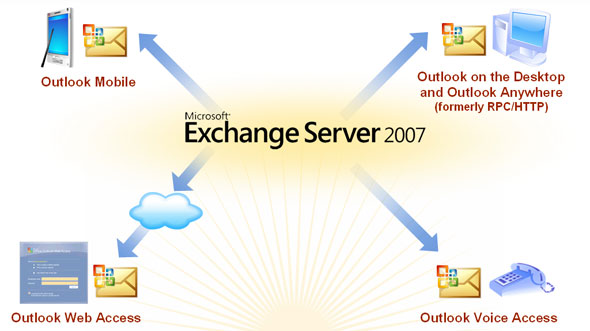
Exchange Server 2007 Beta 2 開放下載,有興趣的可以下載來品嘗一下 DOG FOOD。正式版本預計在 2006 年底推出,到時候又有的玩了。
Microsoft Exchange Server 2007 提供內建的保護技術,可協助讓電子郵件系統一直保持運作,並讓此系統得到更好的保護,以對抗外來的威脅,同時可讓員工無論在哪裡只要使用各種用戶端 (包括 Microsoft Outlook、Outlook Web Access 及行動裝置) 即可工作。Exchange Server 2007 使郵件環境更易於管理和更具成本效益,使得 IT 人員更容易將這些新功能帶進其組織。
按此下載 Exchange Server 2007 Beta 2
按此下載 Exchange Server 2007 Beta 2 統一訊息語言包
Exchange Server 2007 相關技術文件 :
Exchange Server 2007 Beta 2 版本資訊 (繁體中文)
Exchange Server 2007 Beta 2 Features
Exchange Server 2007 Beta 2 System Requirements
Exchange Server 2007 Product Evaluation
Getting Started with Exchange Server 2007 Beta 2
Exchange Server 2007 Beta 2 Planning and Architecture
Exchange Server 2007 Beta 2 Deployment
Exchange Server 2007 Beta 2 Operations
Exchange Server 2007 Beta 2 Technical Reference
Microsoft Exchange Server 2007 Beta 2 Help
星期六, 7月 15, 2006
Exchange Server 效能疑難排解
此技術文章提供了 Exchange Server 2003 的管理者如何利用現有的工具像是效能計數器,Load Simulator, Exchange Stress and Performance 2003, 網路監視器, 和 Filemon 來脫離效能降低的情況。文章中所提供的資訊可以用來確保伺服器不會因為硬體問題或故障造成效能低落。
按此下載
按此下載
星期一, 7月 10, 2006
義大利贏得 2006 世界盃足球賽冠軍
上半場一比一之後雙方就沒有再進球,直到延長賽時法國隊 Zidane 表演頭錘義大利 Materazzi被給了紅牌退場,眾人譁然 ... 最後意大利以 PK 賽 5 比 3 把金盃給抱走了,破了二十年來對法國的不勝的魔咒。

下次在南非舉辦世界盃足球賽的時候就可以看到義大利的球衣上有四顆星的榮耀囉。
世界盃足球賽歷屆冠軍
2006 Italy
2002 Brazil
1998 France
1994 Brazil
1990 West Germany
1986 Argentina
1982 Italy
1978 Argentina
1974 West Germany
1970 Brazil
1966 England
1962 Brazil
1958 Brazil
1954 West Germany
1950 Uruguay
1938 Italy
1934 Italy
1930 Uruguay

下次在南非舉辦世界盃足球賽的時候就可以看到義大利的球衣上有四顆星的榮耀囉。
世界盃足球賽歷屆冠軍
2006 Italy
2002 Brazil
1998 France
1994 Brazil
1990 West Germany
1986 Argentina
1982 Italy
1978 Argentina
1974 West Germany
1970 Brazil
1966 England
1962 Brazil
1958 Brazil
1954 West Germany
1950 Uruguay
1938 Italy
1934 Italy
1930 Uruguay
星期四, 7月 06, 2006
Microsoft 的 Exchange 組織規模
雖然 Microsoft 的 Exchange Server 數量已經比以往降低很多,不過仍然是個規模相當大的 Exchange 組織架構,我們可以看看Microsoft 所提供的幾個有趣數字。(Microsoft 是個很喜歡看數字的公司 ... )
網路環境 :
•Three enterprise data centers.
•Nineteen regional data centers worldwide.
•More than 300 sites in approximately 230 cities in 77 countries.
•More than 3,300 IP subnets.
•More than 2,000 routers.
•More than 10,000 worldwide servers.
•More than 350,000 local area network (LAN) ports.
Exchange Server 環境 :
- 116 servers running Exchange Server 2003 (including passive clustered nodes), of which 63 of the 69 mailbox servers are in clustered configurations running Windows Server 2003.
- Four Exchange sites in regional data centers worldwide.
- Messaging services for approximately 102,000 users.
- More than 118,000 total mailboxes (including system mailboxes).
- 200-megabyte (MB) storage limit for each mailbox.
- More than 10 million messages globally per day. (Approximately 3 million are internal e-mail messages.)
- 20,096 Smartphone devices that access Exchange.
- 5,145 mobile devices running Windows Mobile version 5.0 that access Exchange.
- 2,279 devices not running Windows Mobile but using an Outlook Mobile Access connection.
- 60,482 users connecting to Exchange by Outlook Web Access 2003.
- Approximately 60,000 users connecting to Exchange by remote procedure call (RPC) over Hypertext Transfer Protocol (HTTP) and Outlook 2003."
更詳盡的資訊可以參考以下的 Microsoft IT Showcase,文章中說明了 Microsoft 自己本身是如何管理 Exchange 架構與相關服務。
Managing Exchange Messaging Services by Using Metrics
網路環境 :
•Three enterprise data centers.
•Nineteen regional data centers worldwide.
•More than 300 sites in approximately 230 cities in 77 countries.
•More than 3,300 IP subnets.
•More than 2,000 routers.
•More than 10,000 worldwide servers.
•More than 350,000 local area network (LAN) ports.
Exchange Server 環境 :
- 116 servers running Exchange Server 2003 (including passive clustered nodes), of which 63 of the 69 mailbox servers are in clustered configurations running Windows Server 2003.
- Four Exchange sites in regional data centers worldwide.
- Messaging services for approximately 102,000 users.
- More than 118,000 total mailboxes (including system mailboxes).
- 200-megabyte (MB) storage limit for each mailbox.
- More than 10 million messages globally per day. (Approximately 3 million are internal e-mail messages.)
- 20,096 Smartphone devices that access Exchange.
- 5,145 mobile devices running Windows Mobile version 5.0 that access Exchange.
- 2,279 devices not running Windows Mobile but using an Outlook Mobile Access connection.
- 60,482 users connecting to Exchange by Outlook Web Access 2003.
- Approximately 60,000 users connecting to Exchange by remote procedure call (RPC) over Hypertext Transfer Protocol (HTTP) and Outlook 2003."
更詳盡的資訊可以參考以下的 Microsoft IT Showcase,文章中說明了 Microsoft 自己本身是如何管理 Exchange 架構與相關服務。
Managing Exchange Messaging Services by Using Metrics
星期五, 6月 30, 2006
Internet Explorer 7 Beta 3 下載

Internet Explorer 7 加強使用者瀏覽網站時的安全性與瀏覽網頁時的體驗,同時也讓企業中的網路管理者有更好的管理能力。Internet Explorer 7 Beta 3 可讓網頁開發人員與 IT 專業人員可以開始測試應用程式與網站的相容性。
Windows XP
Windows Server 2003
X64
IA64
Internet Explorer 概觀
星期四, 6月 29, 2006
Microsoft Exchange Server 2007 技術文件預覽
Microsoft 已經準備釋出 Exchange Server 2007 做為測試之用,我們可以先透過這份文件了解 Exchange Server 2007 各個伺服器角色的功能、部屬、操作與安全等相關項目。
Exchange Server 2007 相信會是一個更為可靠且內建防止垃圾郵件與病毒的訊息服務系統,讓使用者在任何地方都能用各種不同的裝置來存取電子郵件、語音、行事曆與聯絡人等資訊。
Microsoft Exchange Server 2007 技術文件預覽
Exchange Server 2007 相信會是一個更為可靠且內建防止垃圾郵件與病毒的訊息服務系統,讓使用者在任何地方都能用各種不同的裝置來存取電子郵件、語音、行事曆與聯絡人等資訊。
Microsoft Exchange Server 2007 技術文件預覽
星期三, 6月 21, 2006
Exchange Server 2007 Beta 2 Demos
現在透過以下官方的 Demo 可以窺探 Exchange 2007 的新功能。
Built-in Protection
•Business Continuity
Data Protection With Local Continuous Replication110 KB 300 KB
•Compliance
Enabling Compliance With Ethical Walls110 KB 300 KB
Enabling Compliance With Journaling110 KB 300 KB
Enabling Compliance With Message Classification110 KB 300 KB
•Anti-Spam and Antivirus Protection
Antivirus Protection With Attachment Filtering110 KB 300 KB
Anti Spam Protection With The Edge Transport Server Role110 KB 300 KB
Anywhere Access
•Outlook Web Access
E-mail And Meeting Experience With Outlook Web Access110 KB 300 KB
Address Book Enhancements In Outlook Web Access110 KB 300 KB
Scheduling Assistant With Outlook Web Access110 KB 300 KB
Out Of Office With Outlook Web Access110 KB 300 KB
Search With Outlook Web Access110 KB 300 KB
•Outlook 2007 and Exchange Server 2007
Office Outlook 2007 and Exchange Server 2007 OverviewView the demo Requires Macromedia Shockwave Player
Auto Account Setup With Office Outlook 2007110 KB 300 KB
Calendar Sharing With Office Outlook 2007110 KB 300 KB
Managed Email Folders With Office Outlook 2007110 KB 300 KB
Out Of Office With Office Outlook 2007110 KB 300 KB
Phone-Based User Experience With Outlook Voice Access110 KB 300 KB
Scheduling Assistant With Office Outlook 2007110 KB 300 KB
Search With Office Outlook 2007110 KB 300 KB
•Unified Messaging
Integrating Communications With Exchange Unified Messaging110 KB 300 KB
Phone-Based User Experience With Outlook Voice Access110 KB 300 KB
Operational Efficiency
•Deployment
Installation Experience With Exchange Server 2007110 KB 300 KB
•Administration
Using The New Exchange Management Console110 KB 300 KB
Automation And Reporting With The Exchange Management Shell110 KB 300 KB
Proactive Management With Exchange Best Practices Analyzer110 KB 300 KB
Built-in Protection
•Business Continuity
Data Protection With Local Continuous Replication110 KB 300 KB
•Compliance
Enabling Compliance With Ethical Walls110 KB 300 KB
Enabling Compliance With Journaling110 KB 300 KB
Enabling Compliance With Message Classification110 KB 300 KB
•Anti-Spam and Antivirus Protection
Antivirus Protection With Attachment Filtering110 KB 300 KB
Anti Spam Protection With The Edge Transport Server Role110 KB 300 KB
Anywhere Access
•Outlook Web Access
E-mail And Meeting Experience With Outlook Web Access110 KB 300 KB
Address Book Enhancements In Outlook Web Access110 KB 300 KB
Scheduling Assistant With Outlook Web Access110 KB 300 KB
Out Of Office With Outlook Web Access110 KB 300 KB
Search With Outlook Web Access110 KB 300 KB
•Outlook 2007 and Exchange Server 2007
Office Outlook 2007 and Exchange Server 2007 OverviewView the demo Requires Macromedia Shockwave Player
Auto Account Setup With Office Outlook 2007110 KB 300 KB
Calendar Sharing With Office Outlook 2007110 KB 300 KB
Managed Email Folders With Office Outlook 2007110 KB 300 KB
Out Of Office With Office Outlook 2007110 KB 300 KB
Phone-Based User Experience With Outlook Voice Access110 KB 300 KB
Scheduling Assistant With Office Outlook 2007110 KB 300 KB
Search With Office Outlook 2007110 KB 300 KB
•Unified Messaging
Integrating Communications With Exchange Unified Messaging110 KB 300 KB
Phone-Based User Experience With Outlook Voice Access110 KB 300 KB
Operational Efficiency
•Deployment
Installation Experience With Exchange Server 2007110 KB 300 KB
•Administration
Using The New Exchange Management Console110 KB 300 KB
Automation And Reporting With The Exchange Management Shell110 KB 300 KB
Proactive Management With Exchange Best Practices Analyzer110 KB 300 KB
Windows Live Messenger 8.0
概觀
Windows Live Messenger 是 MSN Messenger 的昇級版。它擁有所有您喜歡的 Messenger 功能 — 連絡人清單、表情符號、透過文字、語音和視訊與連絡人即時通訊 — 還加上新的連絡方式,以及讓您更輕鬆地分享相片和文件。如同以往,您可以免費下載 Messenger 並使用大部分的有趣功能。
Windows Live Messenger 是 MSN Messenger 的昇級版。它擁有所有您喜歡的 Messenger 功能 — 連絡人清單、表情符號、透過文字、語音和視訊與連絡人即時通訊 — 還加上新的連絡方式,以及讓您更輕鬆地分享相片和文件。如同以往,您可以免費下載 Messenger 並使用大部分的有趣功能。
系統需求
- 支援的作業系統: Windows Server 2003; Windows Vista; Windows XP; Windows XP 64-bit
- Pentium 233 MHz (建議 500 MHz)
- Microsoft Windows XP
- 128 MB RAM (建議 256 MB)
- 安裝所需最多 50 MB 硬碟空間,執行程式需 15 MB
- 電腦必須安裝 Microsoft Internet Explorer 6 SP1 或更新版本,但不一定要設為預設瀏覽器
- 800 x 600 或更高的螢幕解析度
星期二, 6月 20, 2006
Microsoft Exchange Server 2003 災難復原操作手冊
Exchange Server 2003 儲存的最佳化
概觀
您想部署 Microsoft? Exchange Server 2003 嗎?您在意可用性、容錯及效能嗎?如果是,無論您的組織規模如何,都請務必瞭解如何進行 Exchange Server 2003 儲存系統的最佳化。相較於伺服器端 CPU 或 RAM 的不足,磁碟子系統的瓶頸會造成更多的效能問題,而設計不良的磁碟子系統,會讓您的組織更容易發生硬體故障。尤其當磁碟子系統經歷下列情形時,執行效能就會降低:
- 平均讀寫延遲超過 20 毫秒。
- 延遲尖峰超過 50 毫秒且持續超過數秒。
「高磁碟延遲」可說是「效能遲緩」的同義詞。磁碟延遲代價甚鉅,若要改善這個問題,起碼必須:
- 投資購買高效能的磁碟與轉軸。
- 效能考量優於容量考量。
- 使用 DiskPar 對齊磁碟。
以上所有主題在本手冊中都將有詳盡的討論。一般而言,若要最佳化您的儲存系統並避免高磁碟延遲的問題,您必須瞭解:
- Exchange 磁碟 I/O 的發生原因。
- 如何計算磁碟 I/O 的需求。
- 如何最佳化特定的儲存結構。
- 如何驗證儲存系統的效能。
訂閱:
文章 (Atom)